5 Things Jipsa Automates in Your First Week
From meal planning to morning briefings, here are the five tasks Jipsa takes off your plate starting day one. No complex setup, no learning curve.
The beta is open — hand this off to Jipsa. Free to start, no card required.
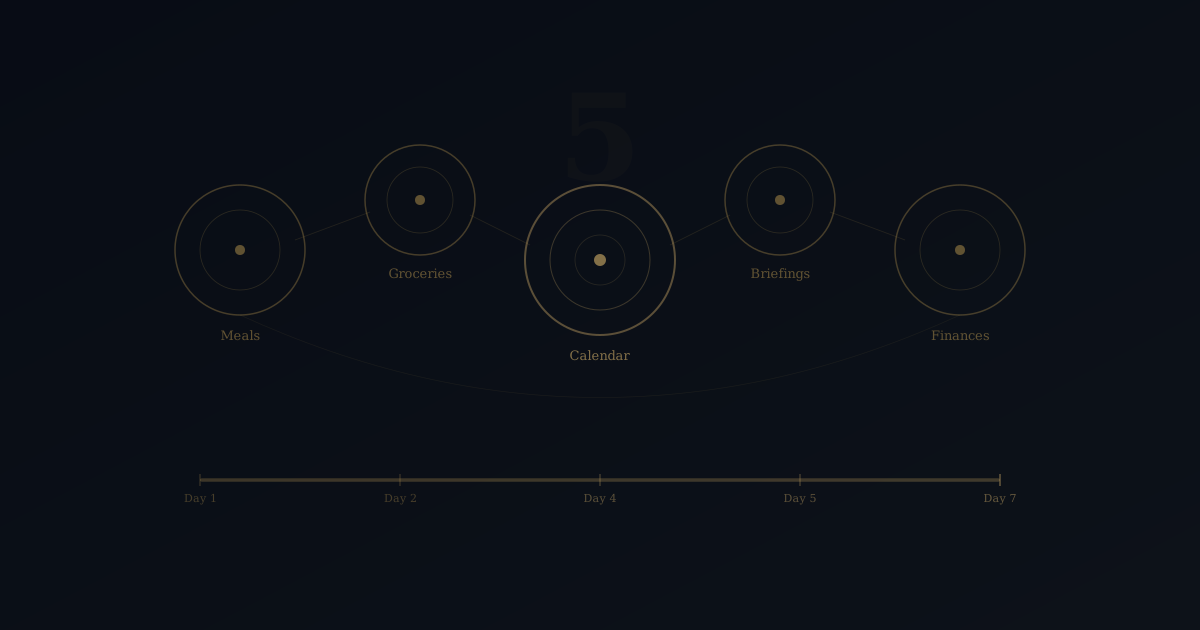
Sign Up for BetaThe first week with Jipsa is designed to make one thing obvious: this is not another app you have to manage. Within days of connecting your services, Jipsa automates five core areas of household logistics -- each one a task you have been doing manually, probably for years. Here are the five things Jipsa automates in your first week and what changes when you stop doing them yourself.
1. Weekly Meal Planning
This is where most people start, and where the impact hits fastest.
On day one, you tell Jipsa about your household -- how many people, dietary restrictions, preferences, budget range. By that evening, Jipsa delivers a full weekly meal plan tailored to your inputs. Not generic recipes pulled from a database. A plan that accounts for what you actually eat, what is in season, and how much you want to spend.
As the week progresses, Jipsa refines. You swap out the Thursday dinner suggestion? Noted. You approve the rest without changes? Also noted. By week two, the plans require fewer edits. By week four, most users barely touch them.
This replaces the Sunday afternoon ritual of scrolling recipes, debating options, and settling on the same rotation. Jipsa does not just suggest meals -- it builds a plan with nutritional balance, variety, and your household's real preferences baked in.
2. Grocery Ordering
Meal planning without grocery execution is just a list of good intentions. Jipsa closes that gap.
Once your meal plan is set, Jipsa generates the grocery list automatically. It cross-references what you need against what you told it you already have (or what it has learned about your pantry patterns). Then it places the order through your connected delivery service -- Instacart, Amazon Fresh, Walmart, or whichever platform you use.
You can review the cart before it ships. Or you can let Jipsa handle it end-to-end. That level of autonomy is yours to set, and you can change it anytime.
What disappears from your life: the 30-45 minutes of list-building, the impulse purchases, the "I forgot the garlic" texts, and the food waste from overbuying. Most users see their grocery spend stabilize within two weeks because Jipsa buys what you need -- nothing more.
3. Calendar Coordination
By day two or three, most users connect their calendars. This is where Jipsa starts demonstrating cross-domain intelligence.
Jipsa reads your calendar and your household members' calendars. It identifies scheduling conflicts before they become problems. It blocks time for tasks that need to happen -- meal prep windows, errand runs, downtime -- based on what your day actually looks like, not what you wish it looked like.
The real value is how Jipsa connects calendar context to other decisions. Heavy meeting day on Wednesday? Jipsa plans a 20-minute dinner, not a 90-minute recipe. Free Sunday afternoon? It might surface a local event or suggest batch-prepping for the week ahead.
This is fundamentally different from a calendar app that just shows you blocks of color. Jipsa uses your schedule as an input for making better decisions across your entire household.
4. Morning Briefings
By mid-week, most users have their first morning briefing. And most do not go back to checking five apps before coffee.
Each morning, Jipsa delivers a concise summary of your day: schedule overview, weather, any tasks it handled overnight (groceries ordered, subscription renewed, maintenance reminder scheduled), and anything that needs your attention or approval.
Think of it as a daily debrief from a chief of staff who has already been working. The briefing is not a notification dump. It is curated context -- the information you need to walk into your day prepared, without the friction of assembling it yourself.
The format adapts to your preferences. Some users want detail. Others want bullet points. Jipsa learns what you engage with and adjusts.
5. Subscription and Recurring Expense Tracking
This one runs quietly in the background, but it tends to surface savings almost immediately.
Connect your financial accounts and Jipsa maps your recurring charges -- streaming services, delivery memberships, software subscriptions, insurance premiums, gym fees. It builds a clear picture of what you pay for monthly and annually, and it monitors for changes.
Within your first week, most users discover at least one subscription they forgot about or a free trial that silently converted to paid. Jipsa flags these without judgment and lets you decide what to keep. Over time, it tracks spending trends and alerts you to unusual charges.
This is not a budgeting app. Jipsa is not going to lecture you about your latte habit. It is a visibility layer that ensures you know where your money goes -- because most people genuinely do not.
What Connects Them
These five automations are useful individually. Together, they are transformative. And the reason is context.
Jipsa does not run five separate automations in parallel. It runs one intelligent system that shares context across domains. Your calendar informs your meal plan. Your meal plan informs your grocery order. Your budget informs all of it. A change in one area cascades through the rest without you coordinating anything.
This is the integration advantage that separates Jipsa from a stack of single-purpose apps. You do not need to be the connective tissue between your tools. Jipsa is the connective tissue.
What Happens After Week One
By the end of your first week, the logistics load is noticeably lighter. The second week, Jipsa gets sharper -- fewer adjustments needed, better suggestions, more proactive recommendations. By the end of the first month, users typically describe it as a shift in how their household operates.
Not because Jipsa changed their life. Because it removed the friction that was getting in the way of it.
Most people expand to additional services after the first week. Home maintenance tracking. Event discovery. Travel planning. Each new connection makes Jipsa more capable, and each capability frees up more of your time and mental energy.
Getting Started
Jipsa is built to deliver value on day one -- not after a month of configuration. Connect one service, and the automation begins. You will feel the difference before the week is over.
Ready to see what Jipsa handles in your first week? The setup takes minutes. The time you get back lasts.
Let Jipsa handle it for you
The beta is open. Create your account and hand off the logistics of everyday life — free to start, no card required.
Sign Up for BetaFree Download
The AI Home Management Checklist
42 tasks AI can handle for your household — from meal planning to home maintenance. See exactly what to automate first.